Distributed Application Integration in Industry |
Employing microservices for enterprise application integration (EAI)

| Journal | Industry 4.0 Science |
| Issue | Volume 41, 2025, Edition 1, Pages 74-80 |
| Bibliography | Share | Cite | Download |
Abstract
Keywords
Article
Nowadays, companies use a variety of information systems to handle their business operations. However, digital transformation is not exclusive to business processes. Rather, entire business models are changing and moving into the digital world. For many companies, information technology is evolving from a support function to an enabling function [1]. The already large number of software applications in use continues to grow.
Information systems in industrial enterprises
The trend towards digitalization not only affects companies in the service sector but also and even more so industrial enterprises. Industrial enterprises often have complex business processes that would be almost inconceivable without software support [2, 3]. In addition to a classic ERP system (Enterprise Resource Planning), the IT system landscape of industrial enterprises therefore usually includes a large number of other software applications. These can include: a CRM system (customer relationship management), a PLM system (product lifecycle management), an MES (manufacturing executions) and a data warehouse and BI (business intelligence) system.
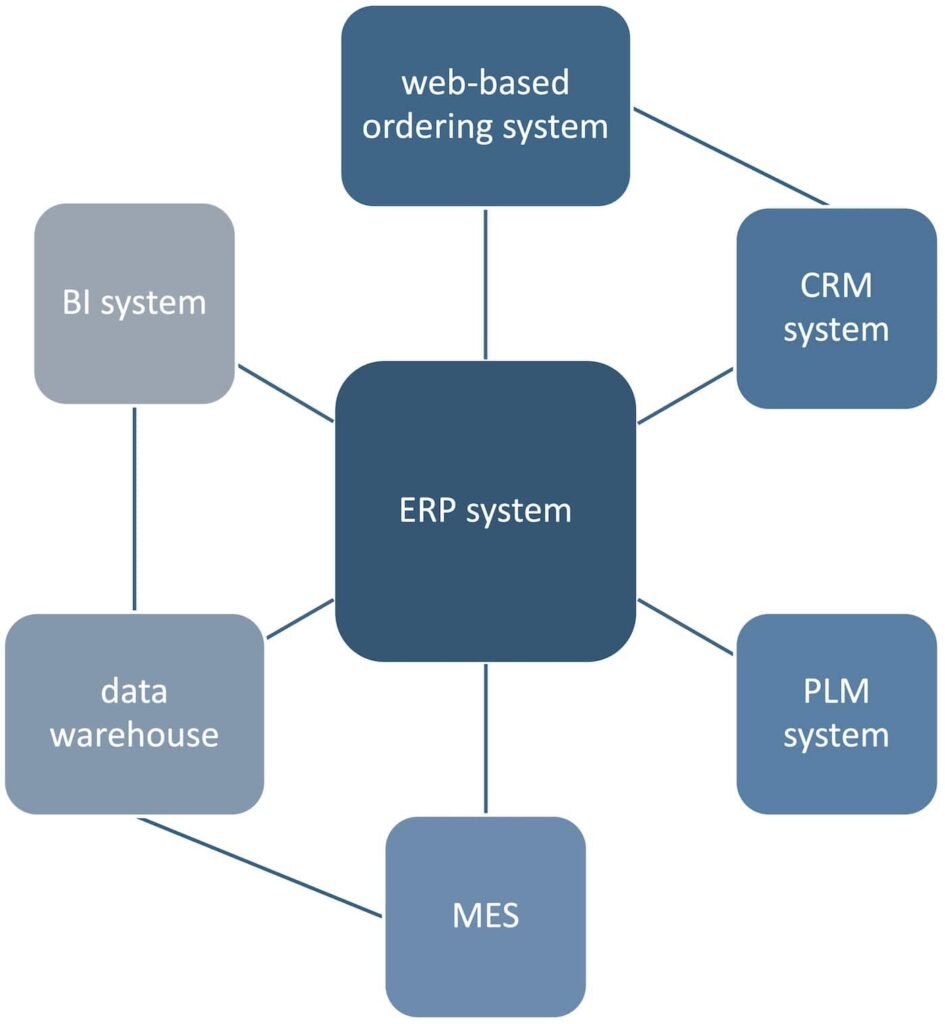
This broad portfolio of operated IT systems is sometimes supplemented by web-based platforms via which customers can place orders directly [4, 5]. Such cloud platforms for direct interaction with the customer have proven to be successful, particularly in the area of manufacturing service providers, and are widely used. In addition, there may be connections to external systems, e.g. from suppliers.
Figure 1 shows an example of a possible IT system landscape of an industrial company. In the middle is a central ERP system, which is surrounded by and connected to several large supporting systems. In addition, the ordering system is linked to the CRM system for the purpose of exchanging customer data. Furthermore, the MES has an interface to the data warehouse in order to be able to perform analyses on production data and there is also a connection between the data warehouse and the BI system.
Application integration as the key to integrated processes
Several information systems are usually involved in the implementation of a business process, which means that a number of different software applications must be employed. To create a holistic and sustainable integration of business processes, system boundaries must be overcome and the exchange of messages via interfaces made possible.
However, it is not only the existence of interfaces that is necessary for message content to be exchanged between systems in a meaningful way. The messages must also be sent in the correct form. Source system and target system often use different formats, encodings and protocols. In addition to setting up the communication infrastructure, another key task of application integration is therefore the translation of the content into the appropriate form.
Figure 2 shows an example of a possible output of the CRM system. The scenario here is that a new customer has been created in the CRM system and must also be stored in the ERP system. However, the ERP system and the CRM system work with different formats: The ERP system expects messages in XML format (Extensible Markup Language), whereas the CRM system delivers a JSON format (JavaScript Object Notation). The fields and field contents also differ. The address is provided in an unstructured form but is required by the ERP system in a structured form. The CRM system provides an ISO code for the country, which must be translated to the full country name.
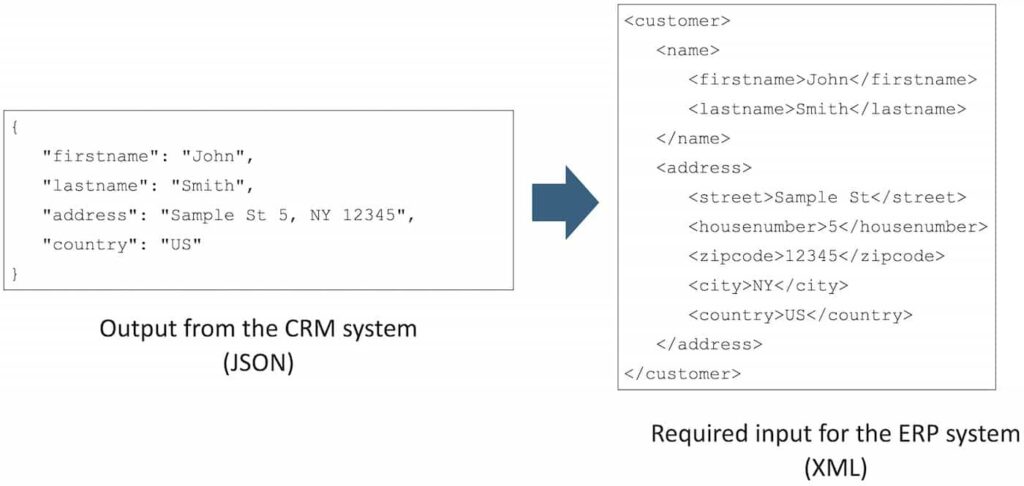
The messages between the two systems must therefore be transformed and fields mapped accordingly. Once the JSON message from the CRM system has been transformed into a correct XML message, including the mapping of the field content, the ERP system can process the message and import the new customer.
Different protocols used by the systems may also need to be considered. For example, the CRM system may provide the output via FTP (File Transfer Protocol), whereas the ERP system only has an HTTP-based (Hypertext Transfer Protocol) REST (Representational State Transfer) interface. A protocol translation must therefore take place as part of the transformation.
Adapters and integration patterns
Transformation tasks within an EAI platform are performed by so-called adapters. The adapter is a classic design pattern in software development [6]. It takes over the translation tasks when an interface that does not correspond to the expected definition is to be addressed. With the help of adapters, it is possible for two systems to communicate with each other without having to adapt their own interfaces. So-called enterprise integration patterns [7, 8] have established themselves as best practice for typical cases of message processing in application integration.
They provide both software developers and system architects with guidelines for the development of stable integration solutions. The patterns include, for example, the ability to filter out certain messages or to divide large messages into smaller individual ones for individual processing. Concrete implementations of enterprise integration patterns can be found in frameworks specially designed for integration tasks, some of which are offered as open source [9].
Monolithic architecture approach in application integration
A classic monolithic architecture for application integration involves a central integration component. All applications that must exchange messages are connected to this integration component, similar to an enterprise service bus [10]. Figure 3 shows an example of a monolithic integration architecture. The integration component is responsible for the exchange of messages between the different system interfaces and handles transformations and protocol translations.
The advantage of a monolithic integration architecture is the initial simplicity of the structure. With the central integration component, there is only one service that takes on the integration tasks. Accordingly, only one code base, namely that of the integration component, must be maintained. Recurring functions, e.g. similar transformations or matching mappings between encodings, only need to be implemented once. They can be shared and reused within the integration component.
The disadvantage of the monolithic approach is the high dependency on the integration component. If it fails during operation and there is no executable replica as a backup, no messages can be exchanged. In addition, the existence of only one code base seems simple but can lead to numerous conflicts during development, e.g. when software developers work on the same code sections in parallel. Furthermore, small changes to just one interface or the addition of another interface lead to a completely new “build and deployment”, so compiling and going live, of the entire integration component. Depending on the size of the integration component, this can involve a great deal of effort.
Microservices for distributed application integration
Emerging from the concept of service orientation, microservices have established themselves as an architectural pattern in application development in recent years, particularly in the development of large cloud-based software applications [10, 11]. The basic principle of microservices is that an application is divided into its core functions. Each microservice takes on a core function, encapsulates it and can provide and execute it whilst remaining largely independent of other services. This results in a high degree of decoupling between the individual microservices. Accordingly, an individual microservice usually has its own code base.
The basic idea behind distributed integration architecture is to transfer the microservice approach to application integration. Adapters represent the essential link between two systems, offering the service of message exchange and transformation. It therefore makes sense to consider and develop an adapter as a separate microservice. Figure 3 provides an example of distributed integration architecture that illustrates the difference to the monolithic approach. Each adapter is developed as a separate microservice. The microservice operates in only one context, e.g. the mapping from CRM to ERP. Hence, code can often be reused within a service.
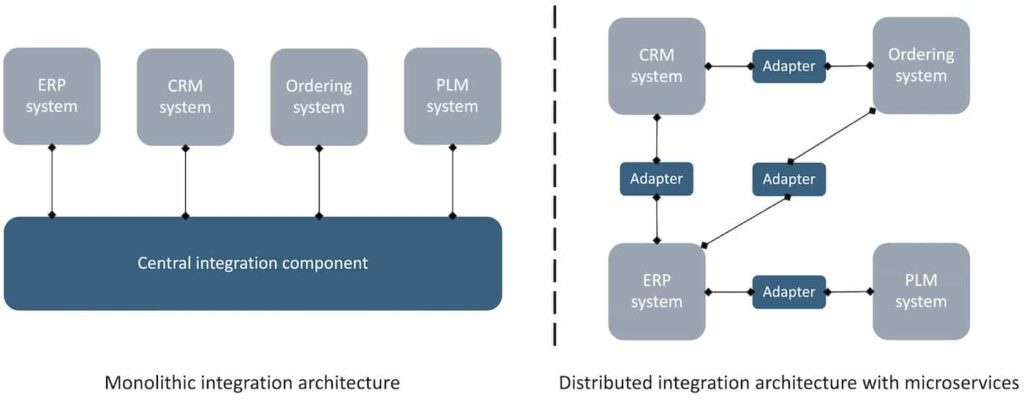
The loose coupling between the microservices results in several advantages. Due to the separate code bases, each adapter can be developed independently. Conflicts during development are therefore avoided. If a new application system must be connected, this does not affect the existing adapters, which can continue to be executed. The adapters are not dependent on each other during development, testing or deployment.
This also applies to updates. If an interface changes, e.g. the ERP customer interface, the monolithic approach would require that the entire integration component be rebuilt and taken live again. With the microservice approach, only the one responsible service or adapter must be adapted, built and installed. New technologies or new versions of a programming language can also first be tested on one service before being rolled out immediately across the entire integration solution.
Due to the high degree of flexibility in the choice of technology, it is also possible to use more open-source technologies, which tends to reduce the cost base. If there is a high load on certain routes, e.g. a lot of messages are sent from the CRM system to the ERP system, the dedicated adapter can be scaled accordingly.
It is important to emphasize that a microservice architecture does not only have advantages. One major disadvantage, for instance, is the overhead caused by the additional administration and orchestration of the services.
Operation in the cloud via container virtualization
Container virtualization has become an established method for keeping operating and administration costs to a minimum, particularly in microservice architectures. A container virtualizes the operating system and makes it possible to operate an application or service largely isolated from its host environment. The container contains the application itself as well as all of its required libraries and dependencies [12].
In the case of a distributed integration architecture, each adapter would be set up as a separate container. Operations in the cluster, i.e. in the computer network, are ensured with the help of orchestration platforms that offer a robust and stable runtime environment. As containers per se support cloud native applications, an integration architecture designed using microservices and containers can be conveniently set up and operated in the cloud. A message broker can serve as the infrastructure component for exchanging messages between application programs and adapters.
Monolithic architectures as a starting point
The practical experience of industrial enterprises that have switched to a distributed integration architecture from a proprietary, central integration component confirms the advantages of the distributed integration solution in terms of agility and scalability. New interfaces can be developed and introduced independently. Distributed operation architecture is more reliable, as problems can usually be solved locally and rarely affect the entire integration platform. The increased use of open-source technologies also means that costs can often be reduced.
However, despite the many advantages of using a distributed integration architecture based on microservices, the additional overhead should always be kept in mind. Several code bases must be maintained during development. Functions cannot be shared directly by the services but must be connected via clearly defined interfaces. During operation, microservices generate higher costs due to the division into different containers, especially in the form of hardware resources. If many microservices run in parallel, they must all be orchestrated and maintained in parallel, too.
For smaller companies that operate few software applications, a monolithic integration architecture with a central component can therefore be an initial starting point to avoid the overhead of microservices. From a critical size, e.g. when the number of connected systems, the number of message transformations to be implemented or the number of software developers involved becomes too large, it can make sense to switch from a monolithic architecture to a microservice architecture.
Bibliography
[1] Kotusev, S.: The Practice of Enterprise Architecture: A Modern Approach to Business and IT Alignment, 2nd edition. Melbourne 2021.[2] Emmelmann, C.; Möhrle, M.; Möller, M.; Rudolph, J.-P.; D’Agostino, N.: Bionic Smart Factory 4.0 – Konzept einer Fabrik zur additiven Fertigung komplexer Produktionsprogramme. In: Industrie 4.0 Management 33 (2017) 4, pp. 38-42.
[3] Rudolph, J.-P.; Emmelmann, C.: Produktionsorganisation in additiven Prozessketten. In: WB Werkstatt + Betrieb 151 (2018) 12, pp. 46-49.
[4] Rudolph, J.-P.: Cloudbasierte Potentialerschließung in der additiven Fertigung. Berlin 2018.
[5] Rudolph, J.-P.; Emmelmann, C.: A Cloud-based Platform for Automated Order Processing in Additive Manufacturing. In: Procedia CIRP 63. Taichung 2017.
[6] Gamma, E.; Helm, R.; Johnson, R.; Vlissides, J.: Design Patterns – Elements of Reusable Object-Oriented Software. Boston 1994.
[7] Hohpe, G.; Woolf, H.: Enterprise Integration Patterns – Designing, Building, and Deploying Messaging Solutions. Boston 2003.
[8] Hohpe, G.: Messaging Patterns Overview – Enterprise Integration Patterns. URL: www.enterpriseintegrationpatterns.com/patterns/messaging/, accessed 17.11.2024.
[9] Apache Software Foundation: Documentation – Apache Camel. URL: camel.apache.org/docs/, accessed 17.11.2024.
[10] Fowler, M.; Lewis, J.: Microservices. URL: www.martinfowler.com/articles/microservices.html, accessed 17.11.2024.
[11] Richardson, C.: Microservice Architecture Pattern. URL: www.microservices.io/patterns/microservices.html, accessed 18.11.2024.
[12] Docker Inc: What is a Container? URL: www.docker.com/resources/what-container/, accessed 18.11.2024.
Potentials: Business Models Services
Solutions: Process Management
You might also be interested in